Giving Claude a Brush: What Tools Actually Are
This post explains tools, the fundamental building blocks of useful agents: what a tool is, how one works, and what each new one lets an agent do. Tools are how an agent observes the world and acts on it; without them, a model can only talk. To make it concrete, we hand Claude a drawing canvas and grant one tool at a time, until it has repainted a Monet, signature and all.
A model with no hands
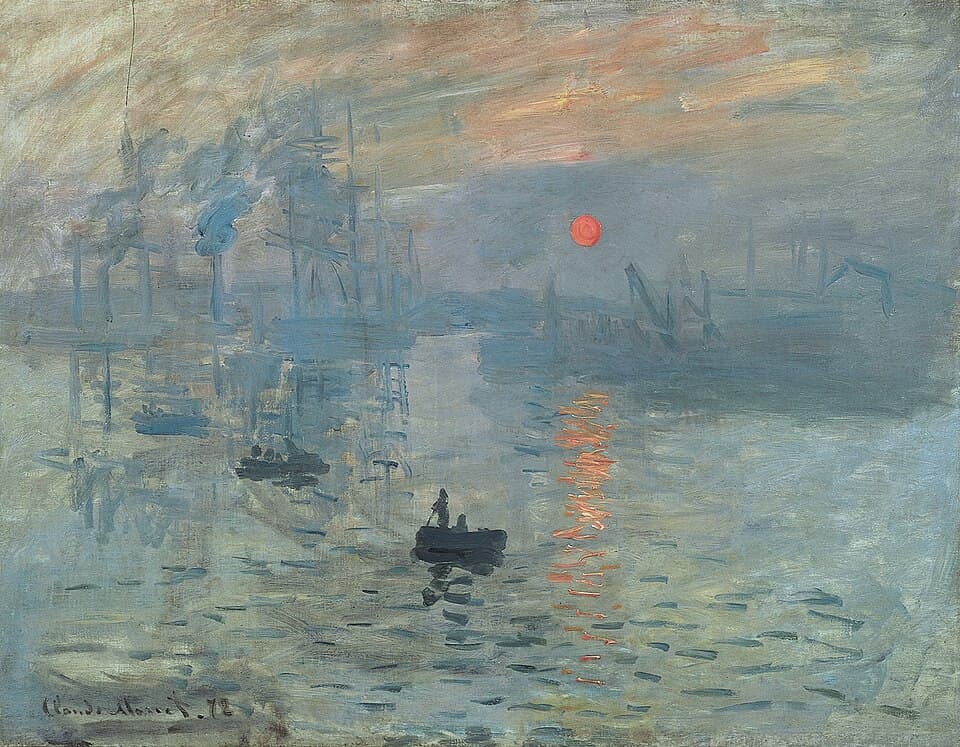
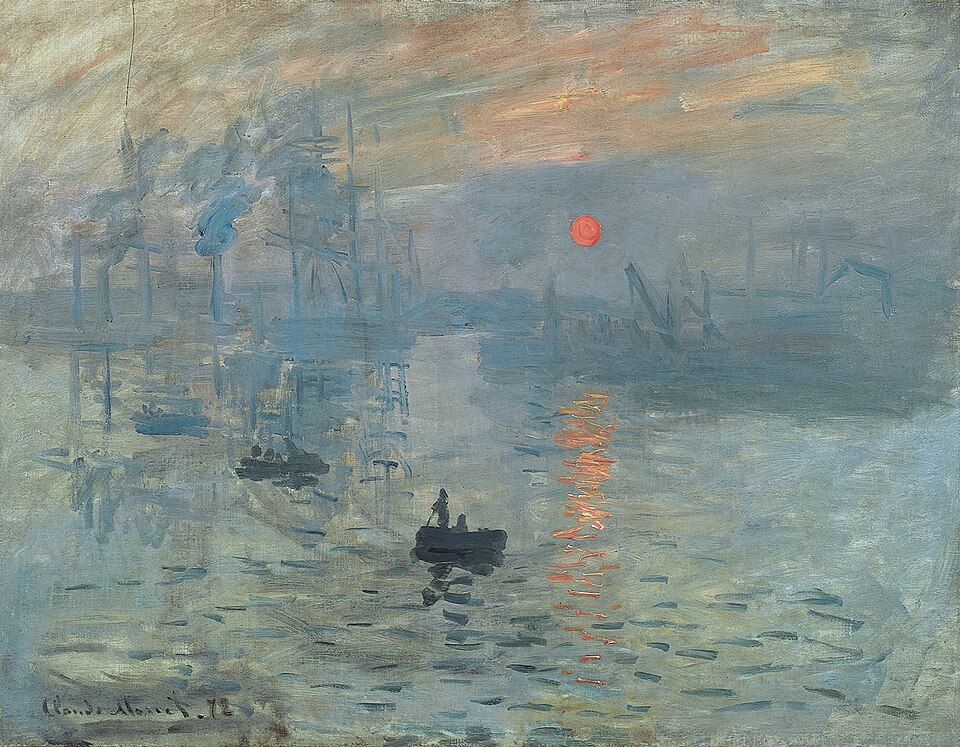
Ask a plain language model about Monet’s Impression, Sunrise and you get a lovely answer: the harbor haze, the orange sun on grey water, the loose strokes that scandalized Paris in 1874. Ask it to paint the thing and nothing can happen. Chat is the only output it has.
We made the same ask with zero tools attached, and the recorded reply shows the model knows exactly what it is missing: it cannot paint, but it would happily write code that draws one. Text can describe a painting, and text can even be a program that would draw one, but text cannot put a stroke on a canvas. In this post we close the gap: we give the model tools, and we make it paint.
If you do not know what a tool is, you have certainly seen one in action: an assistant that searches the web, writes a file, or reads a PDF is calling tools someone handed it. Here we build the same mechanism from scratch, on a drawing canvas small enough to see every moving part, and learn to design tools of our own, which comes down to reads and writes.
The first tool gives it hands
A tool is a small piece of code that lives outside the model. The model cannot run it, only ask for it. Each message you send travels with a short note about every tool the model may use: what it is called, what it does, and what it will accept. Here is the first one we hand over:
The definition has three parts, and each does a different job. The name is what the model calls it by. The description is what the model reads: it is how it knows it has this ability at all, and what it is for. The input lists the arguments the model supplies when it calls, with their types and bounds. This block is the input side of the tool, and it is everything the model will ever see of it.
The other half, the model never sees, and does not need to: the function on my side that executes the call. Here is the experiment’s real handler, lightly compressed:
One real round trip, then, and it is the first call of the very run you are about to watch:
The second line is what came back: Stroke s1 drawn (2 points). That string is the output side. It gets appended to the conversation as the tool result, and it is the only thing the model ever learns about what its call did. Input in, one string out; nothing else crosses in either direction. You can watch this exact call land in the animation: the first stroke of the replay is one straight line across the middle of the canvas: the horizon.
So how does the model know the tool exists? The definition above travels with every request, right beside the conversation, and the model reads it the way it reads everything: as text. That is why the wording matters. A vague description and it guesses what you meant. A loosely typed field and it invents values you never planned for.
The model itself never runs anything. It answers with a name and arguments. Your code looks up the function by that name, runs it, and appends the returned string to the conversation. Then the model reads the result and decides what to do next: another call, or an answer. That loop is the whole trick, and it fits in eight lines:
This section’s animation is already playing the first run, and everything the pixel painter does is a real recorded session, replayed exactly.
The stroke tool came with a second thing: a canvas for the strokes to land on. The canvas itself is never sent to the model. It sits on our side, next to the function, and everything the model knows about it is in the tool definition above: a grid, 0 to 100.
MCP is an open standard for connecting a server of tools to an agent. A later post covers it properly.
The first task was a sunrise over the sea. claude-opus-5, given draw_stroke and nothing else, drew it in thirty strokes, every one a list of integer pairs: a sun with rays, wave lines, a path of reflection, two clouds, two birds. The schema has no color field, so every stroke is black. And no tool returns an image, so the model never saw the canvas it was drawing on. It drew the sunrise blind.
Someone else’s cat
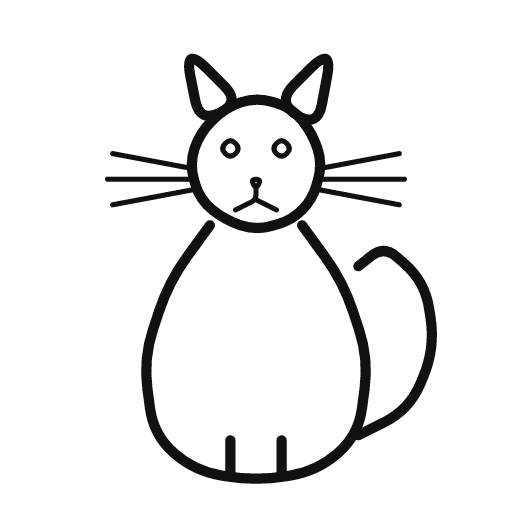
Real agents almost never start from a blank canvas. They edit state they did not create: your codebase, your draft, your inbox. So we made the canvas someone else’s work. One agent drew a cat. Then we handed the finished drawing to a brand new agent, fresh conversation, one task: the same cat, now holding a balloon on a string.
Think about what this new painter actually knows. The task mentions a cat, so it knows one is there. But the cat itself is on the canvas, not in the conversation, and drawing tools only go one way: strokes go out, nothing comes back. Somewhere down there is a paw that should hold the string, and it has no way to find out where.
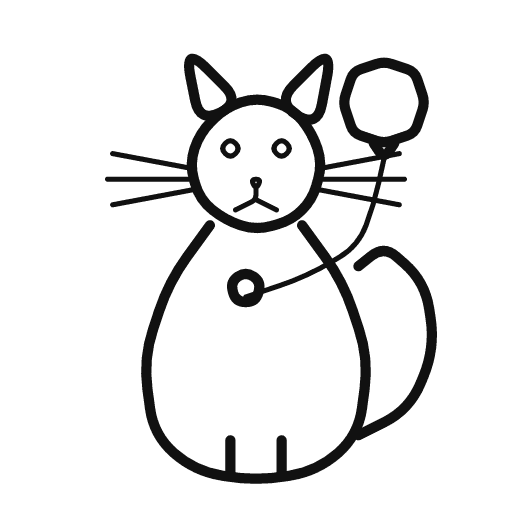
So it guesses. The balloon squeezes in right beside the cat’s head, and the string drapes across its whiskers on the way to a small round paw it invents in the middle of the chest. Then read its sign-off: “so the cat now appears to be holding a balloon.” It is not lying. It is describing the drawing in its head, the only one it can see.
The second tool lets the agent see
So we give the agent the ability to see what is on the canvas:
It takes no arguments and changes nothing in the world. It just returns a picture of the canvas into the conversation, and from then on that picture is part of what the model reads. Write tools move information out of the model; read tools move the world in.
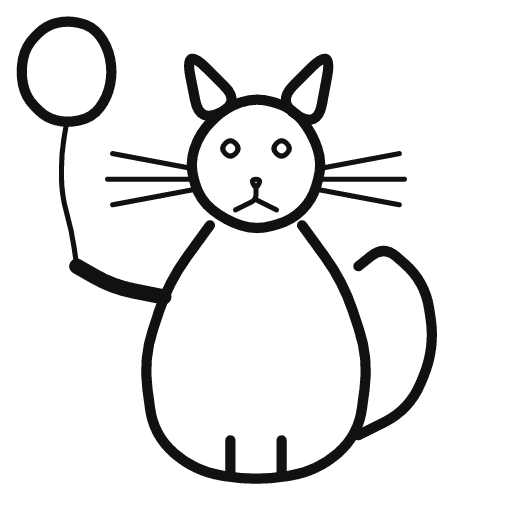
We run the same task again, same starting cat, and this time the agent has both tools. Its first call is view_canvas: before drawing a single stroke, it finds out where the cat actually is. Three strokes follow, and all three land: an outstretched paw, a string running upward from it, a balloon floating clear of the cat’s head. Its last call is view_canvas again, to check the result. Nothing about the model changed between these two runs. It could simply look this time.
Adding color, without a new tool
Next we add color. It takes no new tool, only one optional field on draw_stroke:
The task is the same as the very first run, a sunrise over the sea, painted again now that the field exists: ninety-nine strokes in eighty-two colors, a violet-to-gold sky, a golden sun, the reflection widening down the water, the birds again, and a small sailboat it added on its own. Same model, same subject, same everything else. The only difference is one parameter in one schema.
We could have fixed the choices instead: a short list of named colors, red, yellow, blue, and nothing else, so nothing garish ever lands on the canvas. But language models already know hex values, and which of the sixteen million belong in a sunrise. The free #RRGGBB field simply trusts that knowledge. Neither design is wrong; they are different bets about where judgment should live.
Act, observe, correct
Seeing becomes much more useful once the agent can act on what it sees. So we add one more write tool:
The argument matters here. Erasing needs a stroke’s id, and ids only exist in tool results: every draw comes back with a receipt like Stroke s42 drawn. The two kinds of tool interlock: the agent can only correct what it can name, and it can only name what a result or a look has told it.
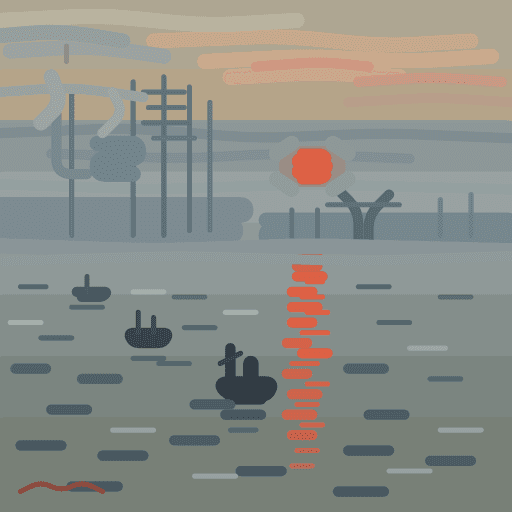
We return to the request from the start of the post: paint Impression, Sunrise. The agent now has all four tools, but no image of the painting to consult; it works from what it remembers from its training. The run takes 326 calls: 271 strokes, nine looks, and 46 erases.









view_canvas calls in 326 turns, and the image each one returned.One stretch of the log shows the loop clearly. At call 185 the agent looked, and the image that came back showed the sun’s reflection sitting on the water as one heavy orange pillar. Its next 43 calls are all erases, every one an orange from that reflection, followed by 25 strokes that rebuild the sunlight in the same palette. The next look, at call 254, shows the result: the pillar broken into sparse dashes of light.



view_canvas returned at calls 185 and 254; the model saw both. The middle panel is reconstructed from the log for the moment after the last of 43 erases, before the 25 redraws. The model never saw it: it erased the reflection and repainted it without looking in between.For all that looking and erasing, the finished painting still differs from the real one in a consistent direction: brighter, cleaner, more orderly.

Each look could only compare the canvas against the model’s memory of the painting, and that memory is what was off.
Nothing guarantees the loop runs, either. Given an easier task with the same tools, a sailing ship, the agent drew twelve strokes and looked once, after the last stroke was down. Across the recorded runs the pattern is consistent: hard tasks get many looks, easy ones one or none. Whether an agent checks its work is something you can design for, in the instructions and the loop around the model. That is harness design, and it gets a post of its own later in this series.
Looking instead of remembering
So far the agent has painted the Monet from memory. What if it could look at the original instead, and sample colors straight from it? Two more read tools, pointed at the world instead of the canvas:
Give the agent these two tools and the same request, and its first call is view_reference. Its next twelve are all pick_color, sampling the sky, the water, and the sun before a single stroke goes down. The haze comes back, the reflection breaks into dabs, and at the bottom it adds a signature, because the original has one. Claude paints Claude Monet, this time from looking instead of remembering.
Nothing about the model changed between the two attempts; only the toolset did. Two tools decided what the agent could know, and what it could know decided what it could paint.
Looking is not free, and nothing enforces it. Every look is a turn spent reading instead of painting, and nothing in the schema makes the model take it: one run in this experiment was handed the reference and finished the painting without looking at it once, 55 draws, one look at its own canvas, zero at the reference. Whether that is rare or common, and what looking actually buys, is a question one example cannot answer. The next post in this series takes it up with proper numbers.
Every capability is a read or a write
Behind every agent you will find the same two kinds of tool. When a coding agent edits a file or a support bot sends an email, that is a write; when an assistant searches the web, reads back a failing test, or queries a database, that is a read.
A tool is a function you hand to a model. Write tools decide what an agent can do. Read tools decide what it can know.
When an agent underperforms, start by reading what it actually did. Every session here was recorded call by call, and those records are where each answer in this post came from. The trail often ends at the toolset.
The balloon the blind run squeezed in beside the cat’s head, its string running to a paw it invented, was not a model failure. It is what drawing looks like when the toolset has no way to look:
The too-bright Monet was not a model failure either; that run could look, and the record shows it looking. At call 185 it finds the reflection sitting there as one heavy pillar, and the erases start on the very next call:
Both outcomes trace back to what the tools let the agent change and see. We kept the five tools in this post as simple as possible for the same reason: with a small toolset, cause and effect stay visible. Reading an agent’s trace is a craft of its own, and a later post takes it up.
The two Monet attempts, next to the original, show the difference two read tools made:
The harness can improve too, better tools and better habits of using them, and that thread is also ahead. One question is bigger: we designed these tools, and the agent only used them. What happens when the agent can design its own is where this series goes next.
Recording notes: every run in this post is a headless agent session against the drawing canvas, logged call by call and replayed here verbatim. The painter only moves when an event in the log says something happened; body language is data visualization, not decoration. More paintings, more models, and the benchmark built on this harness are the next post in this series.
If you found this helpful, share it: